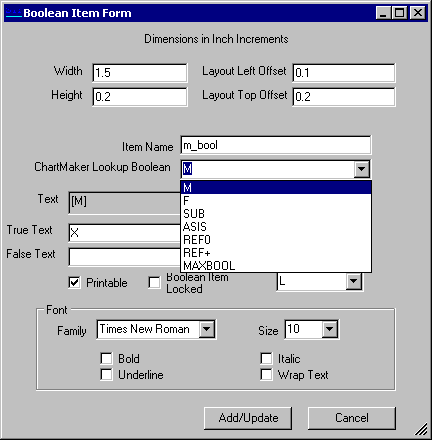
All boolean properties, or attributes, can be updated from the Boolean
Item Form dialog. The choices for boolean items are:
M = male boolean dynamic text
F = female boolean dynamic text
REF0 = 'refill # = 0' boolean dynamic text
REF+ = 'refill # > 0' boolean dynamic text
SUB = 'substitutions permissible' boolean dynamic text
ASIS = 'As Is' (dispense as written) boolean dynamic text
Each boolean object has the same attributes as a database field object, with two new attributes: true text and false text. If the boolean condition is true (answer is yes), then the true text will be rendered on the prescription. If the boolean condition is false (answer is no), then the false text will be rendered on the prescription.
For example, if you need to fill in a prescription blank as follows: "SEX:_____," then select the boolean "male" ('M') with true text equals "male" and false text equals "female". Therefore, if the question "Is the patient a male?" is true, then display "male." If the question is false, then display "female."
Another example, if a prescription has a checkbox as follows: "□ Do Not Refill," then use the boolean REF0, with true text equals "X" and false text equals " " (<blank>). Therefore, if the question "Does the number of refills equals zero?" is true, then display "X." If the question is false, then do not display anything.